Part 1: The Bootloader Chain (AHAB) - Embedded Linux Security on the NXP FRDM i.MX93
A device is only as trustworthy as the software it boots. If an attacker can replace the earliest boot software stored on the boot media, every later stage of the system can no longer be trusted because it ultimately depends on that code. Once that first component is compromised, no software loaded afterward can establish trust on its own.
Secure boot addresses exactly this problem by building a chain of trust from immutable hardware to the operating system. Instead of blindly executing whatever the boot media happens to contain, each stage is checked against the established chain of trust before it is allowed to run. If a check fails anywhere in the chain, execution stops before untrusted code can run.
What this part builds
In this first part, we focus on securing the bootloader. We enable AHAB on the NXP FRDM i.MX93, generate our own Super Root Keys (SRKs), sign the bootable image with NXP’s Secure Provisioning SDK (SPSDK) and permanently bind the device to those SRKs by programming the SRK hash into the one-time programmable (OTP) fuses.
In Part 2: The Kernel (Signed FIT), we extend the chain of trust to the Linux kernel using U-Boot’s FIT (Flattened Image Tree) mechanism.
This series uses the Yocto Project Wrynose 6.0 LTS release with NXP’s
imx-6.18.20-2.0.0BSP manifest. Themeta-frdm-imx93-securitylayer holds the finished form of every recipe, patch, configuration file and build change these parts describe.
AHAB on the i.MX93
AHAB (Advanced High Assurance Boot) is the hardware rooted secure boot architecture used in the i.MX 8/8X/8ULP and i.MX9 families. It relies on signatures to prevent unauthorized software from executing during the boot sequence.
The important point is where authentication takes place. It is performed by the EdgeLock Enclave (ELE), an isolated security subsystem with its own ROM and firmware. The ELE is built around a dedicated RISC-V core and operates independently of the application processors.
The boot software is packaged into one or more AHAB containers rather than being stored as plain binary images. Each container includes the executable images together with metadata, including an SRK (Super Root Key) table containing four public keys and a signature generated with the corresponding private key.
During secure boot, the ELE firmware first hashes the SRK table contained in the container and compares the result with the SRK hash stored in the appropriate fuse bank. This confirms that the container carries the SRK table trusted by the device. The ELE firmware then verifies the container’s signature using the selected public key from that trusted SRK table.
The container signature protects the container metadata, including the container header, the image entry table and the SRK table. Each image entry stores a cryptographic hash of its corresponding image, so the authenticated metadata indirectly protects every image carried by the container. That indirection allows a single signature to protect images of any size. Modifying even a single byte of an image changes its hash, so it no longer matches the value recorded in its entry and the image is rejected. Modifying that entry instead is no easier, because it sits inside the signed area, so any change there invalidates the container signature.
The following figure illustrates the general structure of an AHAB container:
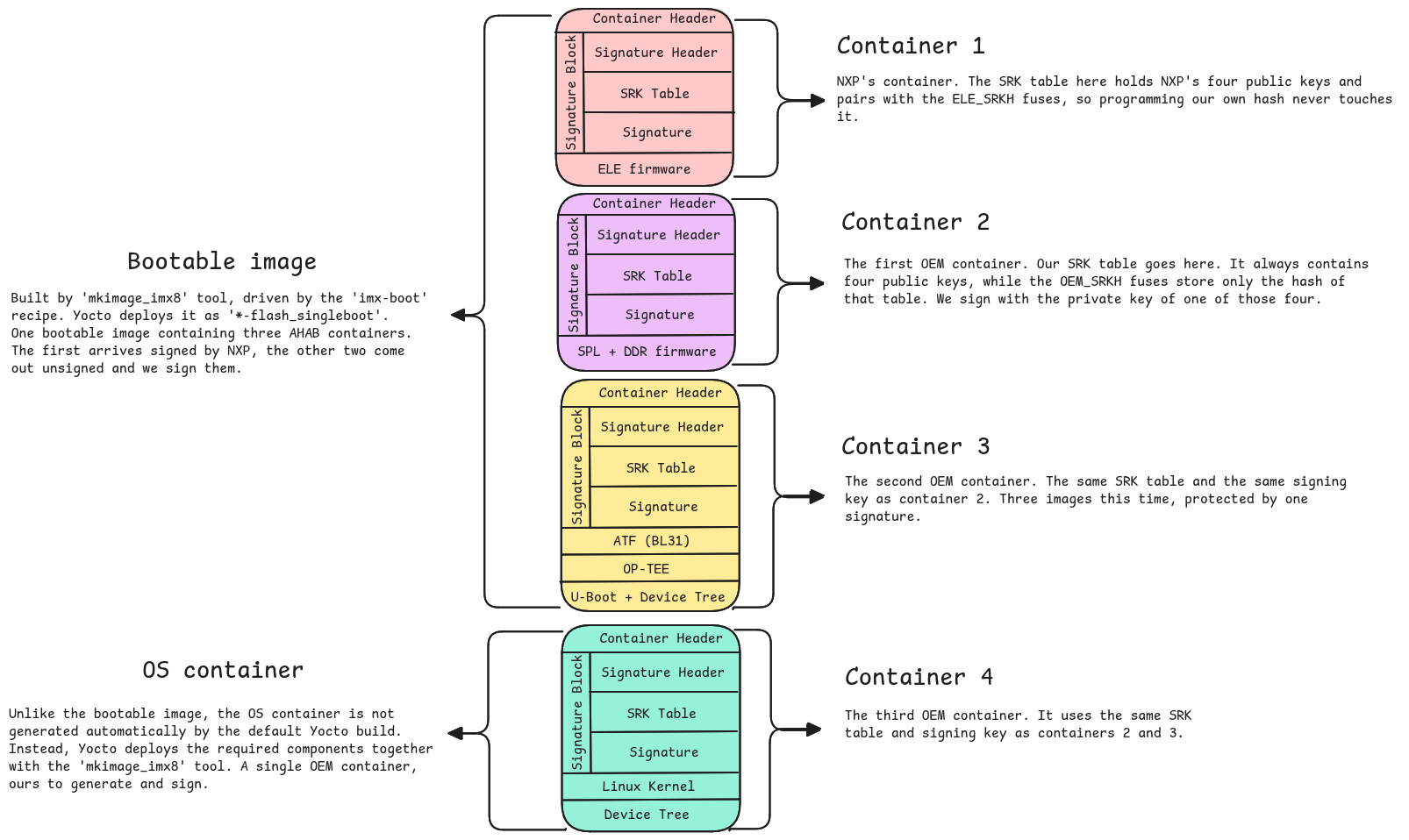
The bootable image is put together by mkimage_imx8. Three names are worth separating because they are easy to confuse: imx-mkimage is NXP’s upstream project, holding a makefile per SoC, mkimage_imx8 is the tool those makefiles run, and imx-boot is the Yocto recipe that drives the whole process. Although the bootable image is deployed as a single file, it actually contains three separate AHAB containers:
- The ELE firmware, provided and signed by NXP using NXP’s own key.
- The SPL + DDR firmware, packaged in an AHAB container that the build leaves unsigned and that we sign with our own OEM key.
- ATF (BL31), OP-TEE and U-Boot + Device Tree, packaged together in another AHAB container that the build leaves unsigned and that we sign with the same OEM key.
The diagram also shows a fourth AHAB container, the OS container. Unlike the other three containers, it is not part of the bootable image and is not generated by the default Yocto build. It is the container NXP’s flow expects to carry the kernel and device tree, and mkimage_imx8 can build one from a deployed kernel and device tree. This series does not use it.
OEM stands for Original Equipment Manufacturer, the company that builds a product around the chip. In this series, that is us. In this configuration, AHAB separates the trust domains into two key owners: NXP and the OEM. This is reflected in the fuse banks, container fields and lifecycle states.
Whenever this series refers to an OEM container, it simply means an AHAB container authenticated against the fused OEM_SRKH.
The ELE authenticates different containers against different SRK hashes. It uses two independent trust anchors and the device contains a separate fuse bank for each:
ELE_SRKH(fuses 64-71) stores NXP’s SRK hash and is programmed during manufacturing.OEM_SRKH(fuses 128-135) stores the OEM SRK hash, which we will program ourselves.
The ELE_SRKH bank is used only to authenticate the ELE firmware. The OEM_SRKH bank is used to authenticate every OEM container. Because these two fuse banks are independent, programming the OEM SRK hash cannot affect the authentication of the ELE firmware.
In the default Yocto build, none of these mechanisms are enabled. The standard build leaves the OEM containers in the bootable image unsigned, AHAB support is disabled in the default U-Boot configuration and the OEM_SRKH fuses remain unprogrammed.
The chain of trust on the i.MX93
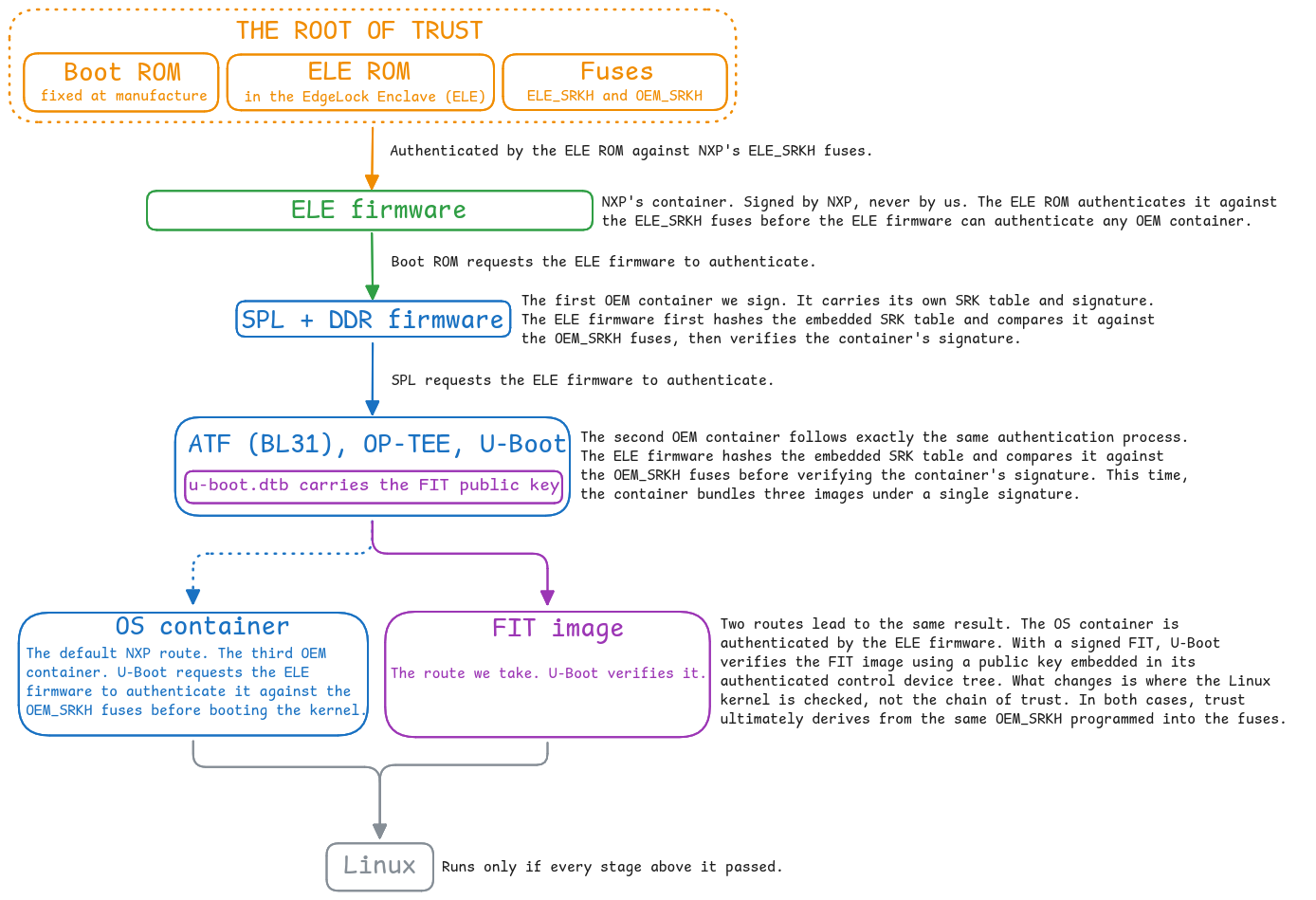
The following diagram summarizes the complete boot chain of trust on the i.MX93. It also shows where our FIT based approach diverges from NXP’s default OS container flow.
Why we use FIT instead of the OS container
Both approaches ensure that only a trusted Linux kernel can be booted. We chose a signed FIT because it relies on U-Boot’s mainline verified boot framework rather than NXP’s OS container mechanism.
The key difference is where the kernel is checked. With an OS container, the ELE firmware authenticates the container before its images are allowed to execute. With a signed FIT image, U-Boot verifies the FIT signature and the hashes of its images before booting Linux.
The public key used for FIT verification is embedded in U-Boot’s control device tree, which is itself authenticated as part of the bootable image. The root of trust stays the same. Only the component performing the final check changes, from the ELE firmware to U-Boot. Choosing FIT favors flexibility and portability while preserving the same security model.
In Part 2, I explain the reasoning behind this choice in more detail.
1. Initialize the BSP
1
repo init -u https://github.com/nxp-imx/imx-manifest.git -b imx-linux-wrynose -m imx-6.18.20-2.0.0.xml && repo sync
2. Set up the build environment
1
MACHINE=imx93-11x11-lpddr4x-frdm DISTRO=fsl-imx-wayland-minimal source ./imx-setup-release.sh -b build-frdm-imx93
3. Create a custom meta layer
Create a custom meta layer to hold our customizations instead of modifying the upstream recipes directly.
1
2
bitbake-layers create-layer ../sources/meta-frdm-imx93-security
bitbake-layers add-layer ../sources/meta-frdm-imx93-security
4. Create a custom machine configuration
Rather than modifying the BSP machine configuration directly, create a new machine that inherits from the default FRDM machine. This keeps all secure boot related changes isolated in our own layer while allowing us to pick up future BSP updates without maintaining local modifications.
1
2
3
4
5
mkdir -p ../sources/meta-frdm-imx93-security/conf/machine

cat > ../sources/meta-frdm-imx93-security/conf/machine/frdm-imx93-secure.conf <<'EOF'
require conf/machine/imx93-11x11-lpddr4x-frdm.conf
EOF
Then update your conf/local.conf to use the new machine:
1
sed -i '1i MACHINE = "frdm-imx93-secure"' conf/local.conf
5. Build the default image
Build the image:
1
bitbake imx-image-core
At this point, our layer only provides the frdm-imx93-secure.conf machine configuration, which simply inherits from the imx93-11x11-lpddr4x-frdm machine in meta-imx-bsp. No other changes have been introduced yet. Building the image at this stage confirms that the new layer and machine configuration integrate cleanly before we start adding secure boot modifications.
6. Set up Python environment and install SPSDK
This series uses NXP’s Secure Provisioning SDK (SPSDK) tool, which covers the entire flow: nxpcrypto for key generation, nxpimage for container signing, nxpele for fuse programming and nxpuuu for flashing. The version is pinned to ensure the commands and outputs shown in this series remain reproducible.
1
2
3
python3 -m venv ~/py_envs
source ~/py_envs/bin/activate
pip install spsdk==3.10.0
7. Flash the default image and confirm it boots
In this series, we will use eMMC instead of an SD card and flashing will be performed using nxpuuu. Set the board’s boot mode switches to Serial Download Mode, power-cycle or reset the board and run nxpuuu list-devices from the host to confirm that the board is detected. The generated bootable image and full system image can be found in the Yocto deploy directory under tmp/deploy/images/frdm-imx93-secure/. Then flash both in a single step:
1
nxpuuu write -b emmc_all imx-boot-frdm-imx93-secure-sd.bin-flash_singleboot imx-image-core-frdm-imx93-secure.rootfs-<timestamp>.wic.zst
Once flashing completes, return the boot mode switches to eMMC Boot and power-cycle or reset the board. If Linux boots successfully, the baseline system is working correctly and we are ready to continue.
8. Enable AHAB in U-Boot and read ahab_status
From this point on we start customizing the BSP through our custom layer. The first change is to enable AHAB support in U-Boot. Rather than modifying the upstream recipes, we add a secure-boot.cfg configuration fragment and a u-boot-imx_%.bbappend in our custom layer.
Create the directory structure:
1
mkdir -p ../sources/meta-frdm-imx93-security/recipes-bsp/u-boot/u-boot-imx
Create the secure-boot.cfg configuration fragment with CONFIG_AHAB_BOOT=y:
1
2
3
cat > ../sources/meta-frdm-imx93-security/recipes-bsp/u-boot/u-boot-imx/secure-boot.cfg <<'EOF'
CONFIG_AHAB_BOOT=y
EOF
Then the u-boot-imx_%.bbappend that feeds that fragment to the U-Boot build:
1
2
3
4
5
cat > ../sources/meta-frdm-imx93-security/recipes-bsp/u-boot/u-boot-imx_%.bbappend <<'EOF'
FILESEXTRAPATHS:prepend := "${THISDIR}/${PN}:"

SRC_URI:append = " file://secure-boot.cfg"
EOF
Rebuild the bootable image after enabling AHAB. To ensure the bootable image is regenerated, clean both recipes and rebuild imx-boot:
1
2
bitbake -c cleansstate u-boot-imx imx-boot
bitbake imx-boot
Or just rebuild the complete image:
1
bitbake imx-image-core
At this point we only need to update the bootable image. Set the board’s boot mode switches to Serial Download Mode, power-cycle or reset the board and run nxpuuu list-devices from the host to confirm that the board is detected. Then flash only the bootable image because we flashed the full image in the previous step:
1
nxpuuu write -b emmc imx-boot-frdm-imx93-secure-sd.bin-flash_singleboot
Once flashing completes, return the boot mode switches to eMMC boot and power-cycle or reset the board. We will get the following log and eventually reach the U-Boot prompt:
1
2
3
4
5
6
7
8
9
10
11
12
13
14
15
16
17
18
19
20
21
22
23
(0 bootflows, 0 valid)
Running BSP bootcmd ...
switch to partitions #0, OK
mmc0(part 0) is current device
** No boot file defined **
Failed to load 'os_cntr_signed.bin'
Booting from net ...
ethernet@428a0000 Waiting for PHY auto negotiation to complete......................................... TIMEOUT !
phy_startup() failed: -110
FAILED: -110
BOOTP broadcast 1
BOOTP broadcast 2
BOOTP broadcast 3
BOOTP broadcast 4
BOOTP broadcast 5
BOOTP broadcast 6
BOOTP broadcast 7

Retry time exceeded; starting again
Authenticate OS container at 0x98000000
Error: Wrong container header
Authenticate OS container is failed
u-boot=>
To understand why enabling CONFIG_AHAB_BOOT immediately changed the boot behavior, we need to look at the U-Boot environment used by our BSP. For the FRDM i.MX93 board, it is defined in board/nxp/imx93_frdm/imx93_frdm.env in NXP’s uboot-imx repository, matching the U-Boot revision used in this series. imx93_frdm.env (lf_v2026.04)
As the environment file shows, enabling CONFIG_AHAB_BOOT automatically sets sec_boot=yes. That changes the execution path inside bsp_bootcmd. Instead of loading the kernel directly, U-Boot first calls loadcntr to load os_cntr_signed.bin (OS container) at cntr_addr, then invokes auth_os before booting Linux.
auth_os is not a separate authentication implementation. In this environment, it expands to booti ${cntr_addr}. When CONFIG_AHAB_BOOT is enabled, the NXP implementation of booti adds an AHAB specific path: it requests the ELE firmware to authenticate the OS container at ${cntr_addr} before continuing with the container’s contents. In other words, enabling CONFIG_AHAB_BOOT changes both the default environment and the behavior of booti.
At this point we had enabled CONFIG_AHAB_BOOT, but we had not created an os_cntr_signed.bin. As a result, loadcntr failed and bsp_bootcmd fell back to netboot, which has its own sec_boot path and still calls auth_os. That is why the log first shows the BOOTP attempts and then the authentication message. auth_os eventually executes booti ${cntr_addr}, causing U-Boot to enter its AHAB path for the image at 0x98000000. Since no valid OS container was present at that address, the process stopped immediately with Error: Wrong container header.
Although the boot failed, this is exactly the behavior we expected. Reaching this point confirms that U-Boot is following the AHAB authentication path.
Now run ahab_status at the U-Boot prompt and take a look at the output:
1
2
3
4
5
6
7
8
9
10
11
12
13
14
u-boot=> ahab_status
Lifecycle: 0x00000008, OEM Open

    0x0287eed6
    IPC = MU APD (0x2)
    CMD = ELE_OEM_CNTN_AUTH_REQ (0x87)
    IND = ELE_NO_AUTHENTICATION_FAILURE_IND (0xEE)
    STA = ELE_SUCCESS_IND (0xD6)

    0x0287eed6
    IPC = MU APD (0x2)
    CMD = ELE_OEM_CNTN_AUTH_REQ (0x87)
    IND = ELE_NO_AUTHENTICATION_FAILURE_IND (0xEE)
    STA = ELE_SUCCESS_IND (0xD6)
Before programming the SRK hash into the fuses, note the output. ELE_OEM_CNTN_AUTH_REQ (0x87) is the OEM container authentication request and ELE_NO_AUTHENTICATION_FAILURE_IND (0xEE) is its result. The request was issued but the ELE firmware performed no authentication, because the OEM containers inside the bootable image are still unsigned.
9. Create the SRKs (Super Root Keys)
Now generate the four SRKs. The hash of these keys becomes the device’s permanent trust anchor once it is programmed into the fuses, so losing the private keys means you can no longer produce bootable image that existing devices will accept. To avoid misplacing them, I created a dedicated artifacts-and-tools directory and will keep these keys together with the other generated artifacts there throughout this series. Use nxpcrypto to create the four RSA-4096 key pairs:
1
2
3
for i in 0 1 2 3; do
    nxpcrypto key generate -k rsa4096 -o keys/srk_${i}.pem
done
Although only one SRK is normally used for signing, the remaining keys provide a built-in recovery mechanism. If the active signing key is ever compromised, future bootable image can be signed with another SRK while the compromised key is permanently revoked. Devices updated with the replacement key can then reject images signed with the revoked key.
This mechanism is finite: only four SRKs are available and there is no way to add a fifth later. Losing all four private keys therefore ends the trusted software lifecycle for every device fused with their hash. Store these keys securely and treat them as long term assets.
A note on keys and production. For simplicity, this part generates the SRKs as PEM files on a development machine so that every step remains visible and reproducible. Production systems should not work this way. Private keys should be generated and protected inside an HSM or another controlled key management system and should not be stored as exportable files. SPSDK supports HSM backed signing through its Signature Provider mechanism, including the
spsdk-pkcs11plugin for HSMs that expose a PKCS#11 interface. The signing process remains the same, only the location and protection of the private key change.This matters more for secure boot than for most signing keys, because the SRK hash is fused permanently. Production devices should therefore be fused using keys that are generated and managed according to a proper key management process from the beginning.
10. Create the signing template
Now that the keys have been created, we can create the signing template. First we look at the supported SoC families:
1
nxpimage ahab get-families -c get-template
1
2
3
4
5
6
7
8
9
10
11
12
13
14
15
16
17
18
19
20
21
22
Shown families for command 'get-template':
Supported families:
 - i.MX Application Processors:
mimx8dxl[a0]             mimx8qm[a0]              mimx8qxp[a0]
mimx8ulp[a0,a1,a2]       mimx9131[a0]             mimx9301[a0,a1]
mimx9302[a0,a1]          mimx9311[a0,a1]          mimx9312[a0,a1]
mimx9321[a0,a1]          mimx9322[a0,a1]          mimx9331[a0,a1]
mimx9332[a0,a1]          mimx9351[a0,a1]          mimx9352[a0,a1]
mimx943[a0]              mimx9512[a0,a1,b0]       mimx9514[a0,a1,b0]
mimx9516[a0,a1,b0]       mimx95294[a0]            mimx9532[a0,a1,b0]
mimx9534[a0,a1,b0]       mimx9536[a0,a1,b0]       mimx9542[a0,a1,b0]
mimx9544[a0,a1,b0]       mimx9546[a0,a1,b0]       mimx9554[a0,a1,b0]
mimx9584[a0,a1,b0]       mimx9586[a0,a1,b0]       mimx9594[a0,a1,b0]
mimx9596[a0,a1,b0]
 - i.MX RT Crossover MCUs:
mimxrt1181[a0,b0]        mimxrt1182[a0,b0]        mimxrt1186[a0,b0]
mimxrt1187[a0,b0]        mimxrt1189[a0,b0]

Abbreviation families names
mx8ulp[a0,a1,a2]         mx91[a0]                 mx93[a0,a1]
mx943[a0]                mx952[a0]                mx95[a0,a1,b0]
rt118x[a0,b0]
Our SoC family is mimx9352, which has two silicon revisions: a0 and a1. This is reflected in the get-families output as mimx9352[a0,a1]. The Yocto BSP used in this series targets the a1 silicon revision. This is defined in imx-base.inc, where IMX_SOC_REV:mx93-generic-bsp is set to A1. The imx-boot recipe then passes this value to imx-mkimage as REV=${IMX_SOC_REV_UPPER}, which produces the mx93a1-ahab-container.img (ELE firmware container) included in the build. So we use a1 throughout this series.
Now we generate the template:
1
nxpimage ahab get-template -f mimx9352 -o sign_config.yaml -s
| Part | Meaning |
|---|---|
nxpimage | SPSDK tool that builds and signs images. |
ahab | The command group holding the i.MX AHAB secure boot commands. |
get-template | Writes a ready configuration file with every field explained in comments, so we never write YAML from scratch. |
-f mimx9352 | The target SoC family, which decides how the template is shaped and which options are valid for that chip. |
-o sign_config.yaml | The file the template is written to. |
-s | Builds the template for the signing flow only. |
The last option (-s) is the one worth highlighting. SPSDK describes this template as being for signing only, intended for use with the ahab sign command. Without -s, the template also includes the fields needed to assemble a new AHAB container from individual images. Since Yocto has already produced the bootable image, we only need the signing configuration for the two OEM containers it already contains.
Here is the generated template:
👉Click to expand and view the generated template👈
1
2
3
4
5
6
7
8
9
10
11
12
13
14
15
16
17
18
19
20
21
22
23
24
25
26
27
28
29
30
31
32
33
34
35
36
37
38
39
40
41
42
43
44
45
46
47
48
49
50
51
52
53
54
55
56
57
58
59
60
61
62
63
64
65
66
67
68
69
70
71
72
73
74
75
76
77
78
79
80
81
82
83
84
85
86
87
88
89
90
91
92
93
94
95
96
97
98
99
100
101
102
103
104
105
106
107
# ===========================  ahab Configuration template for mimx9352, Revision: latest.  ============================

# ======================================================================================================================
#                                                 == General Options ==
# ======================================================================================================================
# -------------------------------------===== The chip family name [Required] =====--------------------------------------
# Description: NXP chip family identifier.
family: mimx9352
# -----------------------------------------===== MCU revision [Optional] =====------------------------------------------
# Description: Revision of silicon. The 'latest' name, means most current revision.
# Possible options: <a0, a1, latest>
revision: latest
# ======================================================================================================================
#                                                  == AHAB Container ==
#     Configurable Container format to add to AHAB image. This allow to configure all aspects of the AHAB container.
# ======================================================================================================================
# -----------------------------------===== Super Root Key (SRK) set [Required] =====------------------------------------
# Description: Defines which set is used to authenticate the container.
# Possible options: <none, nxp, oem, devhsm>
srk_set: none
# ------------------------------------===== Used SRK [Conditionally required] =====-------------------------------------
# Description: Which key from SRK set is being used.
used_srk_id: 0
# ----------------------------------------===== SRK revoke mask [Optional] =====----------------------------------------
# Description: Bit-mask to indicate which SRKs to revoke. Bit set to 1 means revoke key. Bit 0 = revoke SRK_0, bit 1 =
# revoke SRK_1 etc. Example of revocation SRK_0 and SRK_1 - the value should be 0x03
srk_revoke_mask: '0x00'
# -------------------------------------===== GDET runtime behavior [Optional] =====-------------------------------------
# Description: This option defines runtime behavior of Glitch detector. Not supported by all devices and their ELE
# firmware.
#  If omitted, the existing flag value in the parsed container is preserved (no override applied).
#  - disabled:       GDET is disabled after the first OEM container has been authenticated (default behavior)
#  - enabled_eleapi: Automatically enable GDET during all ELE API calls
#  - enabled:        Leave GDET enabled
# Possible options: <disabled, enabled_eleapi, enabled>
gdet_runtime_behavior: disabled
# -------------------------------------------===== Fast boot [Optional] =====-------------------------------------------
# Description: This option enables fast boot mode.
#  If omitted, the existing flag value in the parsed container is preserved (no override applied).
#  - disabled: Fast boot disabled.
#  - hash_and_copy: ELE will do the hash and copy (when disabled, BootROM will do the copy).
#  - external_accelerator: Use external accelerator for authentication (e.g. V2X on i.MX95B0, i.MX943 and i.MX952).
#  - hash_and_copy_with_external_accelerator:ELE will do hash and copy, and use external accelerator for authentication.
# Possible options: <disabled, hash_and_copy, external_accelerator, hash_and_copy_with_external_accelerator>
fast_boot: disabled
# -----------------------------------------===== Fuse version [Optional] =====------------------------------------------
# Description: The value must be equal or greater than the version stored in fuses to allow loading this container.
fuse_version: 0
# ---------------------------------------===== Software version [Optional] =====----------------------------------------
# Description: Number used by Privileged Host Boot Companion (PHBC) to select between multiple images with same Fuse
# version field.
sw_version: 0
# -------------------------------------===== AHAB container signer [Optional] =====-------------------------------------
# Description: Signature provider configuration in format 'type=<identifier>;<key1>=<value1>;<key2>=<value2>' or a
# private key used for sign the container header. Header can be signed by SRK. The referenced SRK must not have been
# revoked.
signer: type=file;file_path=my_prv_key.pem

# ======================================================================================================================
#                                         == Configuration of AHAB SRK table ==
# ======================================================================================================================
# ------------------------------------===== SRK Table [Conditionally required] =====------------------------------------
# Description: SRK (Super Root key) table definition.
srk_table:
  # -------------------------------------------===== CA Flag [Optional] =====-------------------------------------------
  # Description: CA Flag is used by HAB to indicate if the SRK is allowed to sign other keys. In AHAB CA Flag only
  # affects the final SRKH (Super Root Key Hash) value burned into chip fuses. It is not used in the AHAB signing
  # process itself. This option exists only for compatibility with systems where fuses are already programmed. In most
  # cases, this should remain false.
  flag_ca: false
  # ---------------------------------------===== Hash Algorithm [Optional] =====----------------------------------------
  # Description: Hash algorithm used for SRK records. If not specified, default algorithm based on key type will be
  # used.
  # Possible options: <default, sha256, sha384, sha512, sm3>
  hash_algorithm: default
  # ---------------------------------===== Super Root Key (SRK) table [Required] =====----------------------------------
  # Description: Table containing the used SRK records. All SRKs must be of the same type. Supported signing algorithms
  # are: RSA-PSS, ECDSA, ML-DSA, Dilithium or SM2. Supported hash algorithms: sha256, sha384, sha512, sha3_256,
  # sha3_384, sha3_512, shake_128_256, shake_256_512, sm3. Supported key sizes/curves: prime256v1, sec384r1, sec512r1,
  # rsa2048, rsa3072, rsa4096, dil3, dil5, mldsa65, mldsa87, sm2. Certificate may be of Certificate Authority. PQC
  # algorithms are supported just in a new type of AHAB container
  srk_array:
    - my_srk_public_key0.pub
    - my_srk_public_key1.pub
    - my_srk_public_key2.pub
    - my_srk_public_key3.pub

# ======================================================================================================================
#            == Optional configuration of AHAB Container Encryption blob (if not used, erase the section) ==
# ======================================================================================================================
# ----------------------------------------===== Encryption blob [Optional] =====----------------------------------------
# Description: Encryption blob container definition
blob:
  # ---------------------------------------===== Key identifier [Required] =====----------------------------------------
  # Description: The key identifier that has been used to generate DEK keyblob.
  key_identifier: 0
  # ----------------------------------------===== DEK key size [Required] =====-----------------------------------------
  # Description: Data Encryption key size. Used for AES CBC-MAC (128/192/256 size)
  # Possible options: <128, 192, 256>
  dek_key_size: 128
  # -------------------------------------------===== DEK key [Required] =====-------------------------------------------
  # Description: Data Encryption key. Used for AES CBC-MAC (128/192/256 size). The HEX format is accepted
  dek_key: my_dek_key.txt
  # -----------------------------------------===== DEK keyblob [Optional] =====-----------------------------------------
  # Description: Wrapped Data Encryption key. Used for AES CBC-MAC (128/192/256 size). The HEX format is accepted. If
  # NOT used, the empty keyblob is inserted into container and need to be updated later.
  dek_keyblob: my_wrapped_key.txt
What the generated template contains and what we change
The template has four parts. General options (family and revision), the AHAB container settings (SRK set, signer and a few flags), the SRK table (our four public keys) and an optional encryption blob.
These are the fields we change:
| Field | Default | Our value | Why |
|---|---|---|---|
srk_set | none | oem | The container is signed by OEM keys, the key set we own and manage. |
signer | type=file;file_path=my_prv_key.pem | type=file;file_path=keys/srk_0.pem | Sign the OEM containers with the SRK0 private key. |
srk_array | my_srk_public_key0..3.pub | keys/srk_0.pub … keys/srk_3.pub | Our four public keys. |
revision | latest | a1 | Silicon revision. |
blob: section | present | delete it | That section is for container encryption and we only sign. |
We keep the other fields at their defaults, but it helps to know what each one does:
| Field | Default | What it does | Why the default is fine for us |
|---|---|---|---|
used_srk_id | 0 | Which of the four SRKs signs this container. | We sign with the first key, key 0. |
srk_revoke_mask | 0x00 | Bit mask to revoke SRKs in hardware, for example 0x03 revokes SRK0 and SRK1. | We revoke nothing yet. |
gdet_runtime_behavior | disabled | Runtime behavior of the glitch (fault) detector. | This is the standard behavior, where the detector is turned off after the first OEM container is authenticated. |
fast_boot | disabled | Shifts work around to shorten boot. | We are not optimising boot time, so the default stays. The accelerator options would not apply here anyway, since they target V2X on i.MX95, i.MX943 and i.MX952. |
fuse_version | 0 | Anti rollback counter, a container with a value lower than the one in the fuses will not load. | We do not have rollback protection yet. |
sw_version | 0 | Software version field used for rollback protection on platforms that implement it. | It is not used on this configuration, so 0 is sufficient. |
flag_ca | false | Marks the SRK as allowed to sign other keys and it only affects the final SRK hash programmed into the fuses. | We do not use a CA style SRK, so we keep it false. |
hash_algorithm | default | Hash algorithm used for the SRK records. | For RSA keys default already resolves to SHA256, which is what the generated fuse script confirms, so there is nothing to change. |
After the edits, the signing part of the file looks like this:
1
2
3
4
5
6
7
8
9
10
11
12
13
14
15
16
17
18
19
family: mimx9352
revision: a1
srk_set: oem
used_srk_id: 0
srk_revoke_mask: '0x00'
gdet_runtime_behavior: disabled
fast_boot: disabled
fuse_version: 0
sw_version: 0
signer: type=file;file_path=keys/srk_0.pem
srk_table:
  flag_ca: false
  hash_algorithm: default
  srk_array:
    - keys/srk_0.pub
    - keys/srk_1.pub
    - keys/srk_2.pub
    - keys/srk_3.pub
# the blob section is deleted, since we only sign and don't encrypt
One small detail is worth noting. The signer and srk_array paths are resolved relative to the directory containing sign_config.yaml, not the current working directory. As long as sign_config.yaml and the keys directory remain together inside artifacts-and-tools directory, references such as keys/srk_0.pem resolve correctly regardless of where nxpimage is invoked from.
11. Sign, verify and parse the bootable image
The signing configuration is now complete, so the next step is to bring in the bootable image we want to sign. Yocto has already built it as imx-boot-frdm-imx93-secure-sd.bin-flash_singleboot. We copy it from the deploy directory into the artifacts-and-tools directory we created in section 9, so that the signing configuration, keys and bootable image are all kept together.
Now we sign it:
1
2
3
4
5
6
nxpimage -v ahab sign \
    -c sign_config.yaml \
    -b imx-boot-frdm-imx93-secure-sd.bin-flash_singleboot \
    -o signed-flash.bin \
    -fs fuse_scripts \
    --force
| Part | Meaning |
|---|---|
-v | Verbose output, so we can see what the tool does. |
ahab sign | Sign every container in the bootable image that is not NXP’s. |
-c sign_config.yaml | Our signing config. |
-b ...flash_singleboot | The bootable image we sign, the one Yocto built. |
-o signed-flash.bin | The signed bootable image the tool writes. |
-fs fuse_scripts | A directory where the tool also writes the SRK hash fuse scripts. |
--force | Overwrite the output if it already exists. |
This command produces two outputs. The first is signed-flash.bin, the signed bootable image that we will later flash to the board. The second is the fuse_scripts directory, which contains the scripts generated by SPSDK for programming the SRK hash into the device’s one-time programmable fuses.
After signing, it is a good idea to check the result before we touch any hardware:
1
nxpimage -v ahab verify -f mimx9352 -b signed-flash.bin
You might see Overall result: Warning and that is fine. The summary counts 368 succeeded, 1 warning and 0 errors. That single warning sits on the ELE firmware container signed by NXP and reads Decrypted data(Warning): The NXP image can't be verified. That image is encrypted and SPSDK does not have NXP’s key, so it cannot verify it and reports the warning. But, our OEM containers verified successfully without any warnings or errors.
If you want to look inside the signed bootable image, you can also parse it. This extracts the AHAB containers together with their images and the SRK public keys, allowing you to compare the extracted keys with the ones you originally generated.
1
nxpimage -v ahab parse -f mimx9352 -b signed-flash.bin -o parsed
12. Flash the signed bootable image and read ahab_status
Now we flash the signed bootable image into the board and confirm that the ELE firmware successfully processes the signature. We do this before programming any fuses, so no permanent changes have been made yet.
Set the board’s boot mode switches to Serial Download Mode, power-cycle or reset the board and run nxpuuu list-devices from the host to confirm that the board is detected. Then flash the signed bootable image:
1
nxpuuu write -b emmc signed-flash.bin
Once flashing completes, return the boot mode switches to eMMC boot and power-cycle or reset the board. Then stop at the U-Boot prompt and run ahab_status. The difference between the unsigned and signed bootable image should now be visible in the authentication status.
The output should show:
1
2
3
4
5
6
7
8
9
10
11
12
13
14
u-boot=> ahab_status
Lifecycle: 0x00000008, OEM Open

    0x0287fad6
    IPC = MU APD (0x2)
    CMD = ELE_OEM_CNTN_AUTH_REQ (0x87)
    IND = ELE_BAD_KEY_HASH_FAILURE_IND (0xFA)
    STA = ELE_SUCCESS_IND (0xD6)

    0x0287fad6
    IPC = MU APD (0x2)
    CMD = ELE_OEM_CNTN_AUTH_REQ (0x87)
    IND = ELE_BAD_KEY_HASH_FAILURE_IND (0xFA)
    STA = ELE_SUCCESS_IND (0xD6)
For comparison, here is the ahab_status output from section 8, when CONFIG_AHAB_BOOT was enabled but nothing had been signed yet:
1
2
3
4
5
6
7
8
9
10
11
12
13
14
u-boot=> ahab_status
Lifecycle: 0x00000008, OEM Open

    0x0287eed6
    IPC = MU APD (0x2)
    CMD = ELE_OEM_CNTN_AUTH_REQ (0x87)
    IND = ELE_NO_AUTHENTICATION_FAILURE_IND (0xEE)
    STA = ELE_SUCCESS_IND (0xD6)

    0x0287eed6
    IPC = MU APD (0x2)
    CMD = ELE_OEM_CNTN_AUTH_REQ (0x87)
    IND = ELE_NO_AUTHENTICATION_FAILURE_IND (0xEE)
    STA = ELE_SUCCESS_IND (0xD6)
Only one field changed, the IND field, which is the result of the authentication request:
| IND value | Meaning | |
|---|---|---|
| Before | ELE_NO_AUTHENTICATION_FAILURE_IND (0xEE) | No signed containers were available, so the ELE firmware had nothing to authenticate. |
| After | ELE_BAD_KEY_HASH_FAILURE_IND (0xFA) | Signed containers were found, but the hash of the SRK table they carry does not match the value stored in the fuses. |
This change tells us exactly what happened. Before signing, the ELE firmware received an authentication request but found no signed OEM containers, so no authentication was performed. After signing, it authenticated the OEM containers by hashing the SRK table each one carries and comparing the result with the OEM_SRKH fuses. Since those fuses are still unprogrammed, the comparison fails and the ELE firmware reports ELE_BAD_KEY_HASH_FAILURE_IND. This is the expected result because we have not yet programmed the SRK hash into the device.
The lifecycle remains OEM Open, so the board continues booting despite the authentication failure. The device only rejects an unauthenticated bootable image after it has been transitioned to the OEM Closed lifecycle state, which we will do it later.
13. Read the fuse scripts before you run one
When we signed the bootable image in section 11, we passed the -fs fuse_scripts option. As a result, the tool generated a fuse_scripts directory containing the scripts needed to program the SRK hash into fuses:
| File | What it is |
|---|---|
ahab_oem0_srk0_hash.txt | The SRK hash as plain text, for our records. |
ahab_oem0_srk0_hash_nxpele.bcf | A batch script for nxpele that programs that hash into the fuses. |
ahab_oem1_srk0_hash.txt and ahab_oem1_srk0_hash_nxpele.bcf | The same pair for the second OEM container. |
The .bcf file is the important one. It is a batch command file for nxpele containing the fuse write operations needed to program the SRK hash into the device. In this case, it consists of eight write-fuse commands, each writing one 32-bit word of the 256-bit SRK hash into the OEM_SRKH fuse bank.
ahab_oem0_srk0_hash_nxpele.bcf (Your values will differ from mine because we don’t use the same SRKs):
1
2
3
4
5
6
7
8
9
10
11
12
13
14
15
16
17
18
19
20
21
22
23
24
# nxpele AHAB SRK fuses programming script
# Generated by SPSDK 3.10.0
# Family: mimx9352, Revision: a1

# Value: 0xF7A28774F06F573DEBB992C4171C6E241C9BC586AEDE29F0C1008E0A88E3F303
# Description: SHA256 hash digest of hash of four SRK keys
# Grouped register name: SRKH

# OTP ID: OEM_SRKH0, Value: 0x7487A2F7
write-fuse --index 128 --data 0x7487A2F7
# OTP ID: OEM_SRKH1, Value: 0x3D576FF0
write-fuse --index 129 --data 0x3D576FF0
# OTP ID: OEM_SRKH2, Value: 0xC492B9EB
write-fuse --index 130 --data 0xC492B9EB
# OTP ID: OEM_SRKH3, Value: 0x246E1C17
write-fuse --index 131 --data 0x246E1C17
# OTP ID: OEM_SRKH4, Value: 0x86C59B1C
write-fuse --index 132 --data 0x86C59B1C
# OTP ID: OEM_SRKH5, Value: 0xF029DEAE
write-fuse --index 133 --data 0xF029DEAE
# OTP ID: OEM_SRKH6, Value: 0x0A8E00C1
write-fuse --index 134 --data 0xA8E00C1
# OTP ID: OEM_SRKH7, Value: 0x03F3E388
write-fuse --index 135 --data 0x3F3E388
Two scripts are generated, one for each OEM container but they are identical because both containers use the same SRK table and are authenticated against the same OEM_SRKH fuse bank. Programming that fuse bank once is sufficient, so we only need to run one of the scripts. Using the generated script is also safer than entering the fuse values manually, since fuse programming is irreversible.
14. Program the SRK hash into the fuses (CRITICAL, IRREVERSIBLE)
This step programs the SRK hash into the device’s one-time programmable (OTP) fuses. After this, the device permanently records the hash of the trusted SRK table used to authenticate OEM containers.
⚠️ This step is permanent. OTP fuses can only be programmed once, so a wrong
OEM_SRKHvalue cannot be corrected later. The device will then accept only the SRK table whose hash matches that value and generating new SRKs does not help because every OEM container is checked against the hash already in the fuses. Verify the generated fuse values carefully before programming them.Programming the SRK hash alone does not enforce secure boot. As long as the device remains in the
OEM Openlifecycle state, authentication failures are reported but not enforced, so the board can still boot images that fail authentication. Enforcement begins only after the lifecycle is transitioned toOEM Closed. We keep the device inOEM Openfor now, making it safe to verify the complete secure boot flow before permanently enabling enforcement.
Serial port handoff (IMPORTANT, READ IT)
nxpele communicates with the ELE firmware through U-Boot over the serial port /dev/ttyACM0. This is the same port used by the U-Boot console, so no other program can keep it open while nxpele is running.
Before running any nxpele command:
- Power on the board and wait until it reaches the
u-boot=>prompt. Stop autoboot if necessary and leave U-Boot idle at the prompt. - Close your serial terminal to release
/dev/ttyACM0. - Run the
nxpelecommand from the host inside the Python virtual environment where SPSDK is installed. The command communicates with U-Boot over the serial port and prints its output directly in the host terminal.
In this series, we use the uboot_serial communication method throughout and the -d uboot_serial option in the commands below selects it explicitly. The option is required because SPSDK defines a default communication method for each supported device. For mimx9352 (our SoC), that default is uboot_fastboot. If -d uboot_serial is omitted, nxpele will use uboot_fastboot instead. That communication method uses U-Boot’s Fastboot interface over USB and requires console multiplexing (CONFIG_CONSOLE_MUX) in addition to AHAB support (CONFIG_AHAB_BOOT), both of which are enabled in this build. It also requires interrupting autoboot, entering the U-Boot console and manually starting the fastboot 0 service before executing any host side nxpele command.
Knowing which communication method is active avoids confusing failures during operations such as fuse programming.
Step 1: Read the fuses and confirm they are empty
1
2
3
for i in $(seq 128 135); do
  nxpele -p /dev/ttyACM0 -d uboot_serial -f mimx9352 -v read-common-fuse --index $i
done
Every value must be 0x00000000. For example, Fuse ID_128: 0x00000000. If any value from index 128 to 135 is different from 0x00000000, stop and investigate. Do not write anything. Here is my output:
👉Click to expand verification output (Fuse IDs 128-135 = 0x00000000)👈
1
2
3
4
5
6
7
8
9
10
11
12
13
14
15
16
17
18
19
20
21
22
23
24
25
26
27
28
29
30
31
32
33
34
35
36
37
38
39
40
41
42
43
44
45
46
47
48
49
50
51
52
53
54
55
56
57
58
59
60
61
62
63
64
65
66
67
68
69
70
71
72
73
74
75
76
77
78
79
80
81
82
83
84
85
86
87
88
89
90
91
92
93
94
95
INFO:spsdk.ele.ele_comm:ELE communicator is using 131072 B size buffer at 83800000 address in mimx9352, Revision: latest target.
INFO:spsdk.ele.ele_comm:Sent message information:
Command:         READ_COMMON_FUSE - (0x97)
Command words:   2
Command data:    False
Response words:  3
Response data:   False
Response status: Success

Read common fuse ends successfully.
Fuse ID_128: 0x00000000

INFO:spsdk.ele.ele_comm:ELE communicator is using 131072 B size buffer at 83800000 address in mimx9352, Revision: latest target.
INFO:spsdk.ele.ele_comm:Sent message information:
Command:         READ_COMMON_FUSE - (0x97)
Command words:   2
Command data:    False
Response words:  3
Response data:   False
Response status: Success

Read common fuse ends successfully.
Fuse ID_129: 0x00000000

INFO:spsdk.ele.ele_comm:ELE communicator is using 131072 B size buffer at 83800000 address in mimx9352, Revision: latest target.
INFO:spsdk.ele.ele_comm:Sent message information:
Command:         READ_COMMON_FUSE - (0x97)
Command words:   2
Command data:    False
Response words:  3
Response data:   False
Response status: Success

Read common fuse ends successfully.
Fuse ID_130: 0x00000000

INFO:spsdk.ele.ele_comm:ELE communicator is using 131072 B size buffer at 83800000 address in mimx9352, Revision: latest target.
INFO:spsdk.ele.ele_comm:Sent message information:
Command:         READ_COMMON_FUSE - (0x97)
Command words:   2
Command data:    False
Response words:  3
Response data:   False
Response status: Success

Read common fuse ends successfully.
Fuse ID_131: 0x00000000

INFO:spsdk.ele.ele_comm:ELE communicator is using 131072 B size buffer at 83800000 address in mimx9352, Revision: latest target.
INFO:spsdk.ele.ele_comm:Sent message information:
Command:         READ_COMMON_FUSE - (0x97)
Command words:   2
Command data:    False
Response words:  3
Response data:   False
Response status: Success

Read common fuse ends successfully.
Fuse ID_132: 0x00000000

INFO:spsdk.ele.ele_comm:ELE communicator is using 131072 B size buffer at 83800000 address in mimx9352, Revision: latest target.
INFO:spsdk.ele.ele_comm:Sent message information:
Command:         READ_COMMON_FUSE - (0x97)
Command words:   2
Command data:    False
Response words:  3
Response data:   False
Response status: Success

Read common fuse ends successfully.
Fuse ID_133: 0x00000000

INFO:spsdk.ele.ele_comm:ELE communicator is using 131072 B size buffer at 83800000 address in mimx9352, Revision: latest target.
INFO:spsdk.ele.ele_comm:Sent message information:
Command:         READ_COMMON_FUSE - (0x97)
Command words:   2
Command data:    False
Response words:  3
Response data:   False
Response status: Success

Read common fuse ends successfully.
Fuse ID_134: 0x00000000

INFO:spsdk.ele.ele_comm:ELE communicator is using 131072 B size buffer at 83800000 address in mimx9352, Revision: latest target.
INFO:spsdk.ele.ele_comm:Sent message information:
Command:         READ_COMMON_FUSE - (0x97)
Command words:   2
Command data:    False
Response words:  3
Response data:   False
Response status: Success

Read common fuse ends successfully.
Fuse ID_135: 0x00000000
Step 2: Program the SRK hash (run only one script)
The generated scripts ahab_oem0_srk0_hash_nxpele.bcf and ahab_oem1_srk0_hash_nxpele.bcf, created in section 11, contain the same SRK hash values. Both OEM containers carry the same SRK table and the device has only one OEM_SRKH fuse bank. Therefore, only one of these scripts needs to be executed. Also, your .bcf script values will differ from mine because we don’t use the same SRKs. The outputs I will provide below is my own, for example purposes.
⚠️This is the irreversible step. Verify all values carefully before proceeding. Fuse programming cannot be undone.⚠️
1
nxpele -p /dev/ttyACM0 -d uboot_serial -f mimx9352 -v batch fuse_scripts/ahab_oem0_srk0_hash_nxpele.bcf
You must see eight WRITE_FUSE messages, each ending with ELE write fuse ends successfully..
Here is my output:
👉Click to expand SRK hash fuse programming output (8 successful writes)👈
1
2
3
4
5
6
7
8
9
10
11
12
13
14
15
16
17
18
19
20
21
22
23
24
25
26
27
28
29
30
31
32
33
34
35
36
37
38
39
40
41
42
43
44
45
46
47
48
49
50
51
52
53
54
55
56
57
58
59
60
61
62
63
64
65
66
67
68
69
70
71
72
73
INFO:spsdk.ele.ele_comm:ELE communicator is using 131072 B size buffer at 83800000 address in mimx9352, Revision: latest target.
INFO:spsdk.ele.ele_comm:Sent message information:
Command:         WRITE_FUSE - (0xd6)
Command words:   3
Command data:    False
Response words:  3
Response data:   False
Response status: Success

ELE write fuse ends successfully.
INFO:spsdk.ele.ele_comm:Sent message information:
Command:         WRITE_FUSE - (0xd6)
Command words:   3
Command data:    False
Response words:  3
Response data:   False
Response status: Success

ELE write fuse ends successfully.
INFO:spsdk.ele.ele_comm:Sent message information:
Command:         WRITE_FUSE - (0xd6)
Command words:   3
Command data:    False
Response words:  3
Response data:   False
Response status: Success

ELE write fuse ends successfully.
INFO:spsdk.ele.ele_comm:Sent message information:
Command:         WRITE_FUSE - (0xd6)
Command words:   3
Command data:    False
Response words:  3
Response data:   False
Response status: Success

ELE write fuse ends successfully.
INFO:spsdk.ele.ele_comm:Sent message information:
Command:         WRITE_FUSE - (0xd6)
Command words:   3
Command data:    False
Response words:  3
Response data:   False
Response status: Success

ELE write fuse ends successfully.
INFO:spsdk.ele.ele_comm:Sent message information:
Command:         WRITE_FUSE - (0xd6)
Command words:   3
Command data:    False
Response words:  3
Response data:   False
Response status: Success

ELE write fuse ends successfully.
INFO:spsdk.ele.ele_comm:Sent message information:
Command:         WRITE_FUSE - (0xd6)
Command words:   3
Command data:    False
Response words:  3
Response data:   False
Response status: Success

ELE write fuse ends successfully.
INFO:spsdk.ele.ele_comm:Sent message information:
Command:         WRITE_FUSE - (0xd6)
Command words:   3
Command data:    False
Response words:  3
Response data:   False
Response status: Success

ELE write fuse ends successfully.
Step 3: Read the fuses again and verify the programmed values
1
2
3
for i in $(seq 128 135); do
  nxpele -p /dev/ttyACM0 -d uboot_serial -f mimx9352 -v read-common-fuse --index $i
done
Verify that the values read back from the device match the values in your generated ahab_oem0_srk0_hash_nxpele.bcf file. Specifically, confirm that every value from Fuse ID_128 through Fuse ID_135 matches the corresponding OEM_SRKH0 through OEM_SRKH7 entries.
Here is my output:
👉Click to expand SRK hash fuse verification output👈
1
2
3
4
5
6
7
8
9
10
11
12
13
14
15
16
17
18
19
20
21
22
23
24
25
26
27
28
29
30
31
32
33
34
35
36
37
38
39
40
41
42
43
44
45
46
47
48
49
50
51
52
53
54
55
56
57
58
59
60
61
62
63
64
65
66
67
68
69
70
71
72
73
74
75
76
77
78
79
80
81
82
83
84
85
86
87
88
89
90
91
92
93
94
95
INFO:spsdk.ele.ele_comm:ELE communicator is using 131072 B size buffer at 83800000 address in mimx9352, Revision: latest target.
INFO:spsdk.ele.ele_comm:Sent message information:
Command:         READ_COMMON_FUSE - (0x97)
Command words:   2
Command data:    False
Response words:  3
Response data:   False
Response status: Success

Read common fuse ends successfully.
Fuse ID_128: 0x7487A2F7

INFO:spsdk.ele.ele_comm:ELE communicator is using 131072 B size buffer at 83800000 address in mimx9352, Revision: latest target.
INFO:spsdk.ele.ele_comm:Sent message information:
Command:         READ_COMMON_FUSE - (0x97)
Command words:   2
Command data:    False
Response words:  3
Response data:   False
Response status: Success

Read common fuse ends successfully.
Fuse ID_129: 0x3D576FF0

INFO:spsdk.ele.ele_comm:ELE communicator is using 131072 B size buffer at 83800000 address in mimx9352, Revision: latest target.
INFO:spsdk.ele.ele_comm:Sent message information:
Command:         READ_COMMON_FUSE - (0x97)
Command words:   2
Command data:    False
Response words:  3
Response data:   False
Response status: Success

Read common fuse ends successfully.
Fuse ID_130: 0xC492B9EB

INFO:spsdk.ele.ele_comm:ELE communicator is using 131072 B size buffer at 83800000 address in mimx9352, Revision: latest target.
INFO:spsdk.ele.ele_comm:Sent message information:
Command:         READ_COMMON_FUSE - (0x97)
Command words:   2
Command data:    False
Response words:  3
Response data:   False
Response status: Success

Read common fuse ends successfully.
Fuse ID_131: 0x246E1C17

INFO:spsdk.ele.ele_comm:ELE communicator is using 131072 B size buffer at 83800000 address in mimx9352, Revision: latest target.
INFO:spsdk.ele.ele_comm:Sent message information:
Command:         READ_COMMON_FUSE - (0x97)
Command words:   2
Command data:    False
Response words:  3
Response data:   False
Response status: Success

Read common fuse ends successfully.
Fuse ID_132: 0x86C59B1C

INFO:spsdk.ele.ele_comm:ELE communicator is using 131072 B size buffer at 83800000 address in mimx9352, Revision: latest target.
INFO:spsdk.ele.ele_comm:Sent message information:
Command:         READ_COMMON_FUSE - (0x97)
Command words:   2
Command data:    False
Response words:  3
Response data:   False
Response status: Success

Read common fuse ends successfully.
Fuse ID_133: 0xF029DEAE

INFO:spsdk.ele.ele_comm:ELE communicator is using 131072 B size buffer at 83800000 address in mimx9352, Revision: latest target.
INFO:spsdk.ele.ele_comm:Sent message information:
Command:         READ_COMMON_FUSE - (0x97)
Command words:   2
Command data:    False
Response words:  3
Response data:   False
Response status: Success

Read common fuse ends successfully.
Fuse ID_134: 0x0A8E00C1

INFO:spsdk.ele.ele_comm:ELE communicator is using 131072 B size buffer at 83800000 address in mimx9352, Revision: latest target.
INFO:spsdk.ele.ele_comm:Sent message information:
Command:         READ_COMMON_FUSE - (0x97)
Command words:   2
Command data:    False
Response words:  3
Response data:   False
Response status: Success

Read common fuse ends successfully.
Fuse ID_135: 0x03F3E388
Step 4: Reboot and check ahab_status
A reboot is required because ahab_status reports the authentication events recorded when the board started. Programming the fuses does not clear events that have already been recorded.
Reconnect your serial terminal, power cycle or reset the board, stop at the U-Boot prompt and run:
1
u-boot=> ahab_status
The output MUST show that no authentication events were found. My output is:
1
2
3
Lifecycle: 0x00000008, OEM Open

	No Events Found!
This time, the ELE firmware successfully authenticates both signed OEM containers in the bootable image because the programmed OEM_SRKH now matches the hash of the SRK table embedded in those containers. Since no authentication failure occurs during this boot, ahab_status reports No Events Found!.
15. The final step: closing the device (not in this part)
The AHAB part of the secure boot chain is now complete. The ELE firmware authenticates every OEM container in the bootable image and ahab_status confirms that no authentication failures occurred during boot.
There is one final step but we do not perform it in this part.
The device is still in the OEM Open lifecycle state. In this state, the ELE firmware authenticates every OEM container but authentication failures are only reported. Moving the device to OEM Closed changes that behavior. From then on, the device boots only bootable image whose OEM containers can be successfully authenticated.
The lifecycle can only move forward, from OEM Open to OEM Closed and the transition is irreversible.
We will move the device to the OEM Closed lifecycle state in section 10 of Part 2, after both OEM container authentication and FIT signature verification have been confirmed.
16. Where we are and what comes next
At this point, the secure boot chain now reaches U-Boot. We signed the bootable image, programmed the SRK hash into the fuses and the ELE firmware now authenticates the boot components successfully on every boot without reporting security events.
But the chain stops at U-Boot. Right now U-Boot would still boot any kernel it is given. To carry the trust boundary one step further, U-Boot must verify the kernel before handing execution to it. As decided earlier, we do this with a signed FIT image instead of an OS container.
Continue to Part 2: The Kernel (Signed FIT)